# Create a collection template

## Create a template

* Go to the **Customizer**
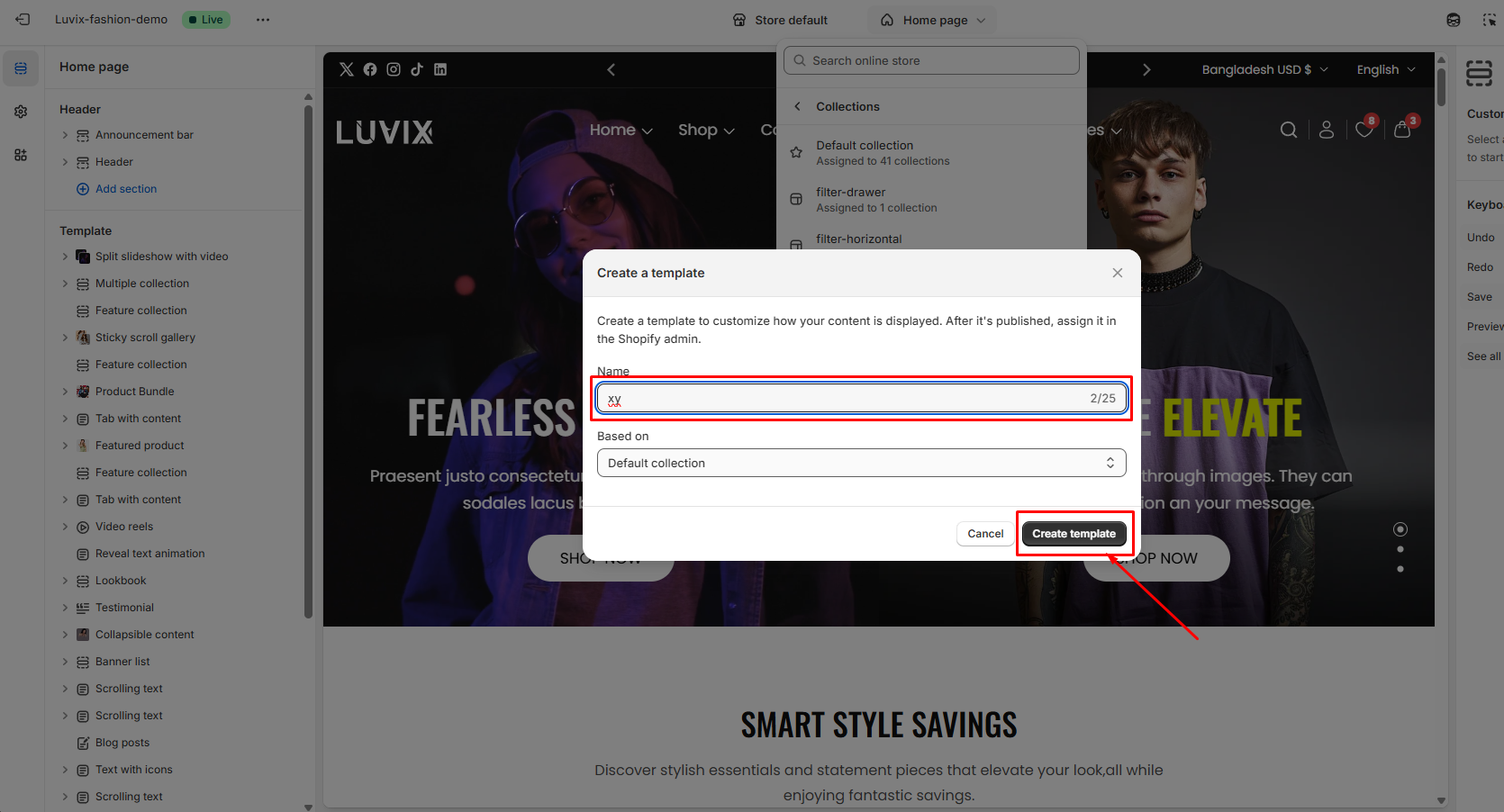
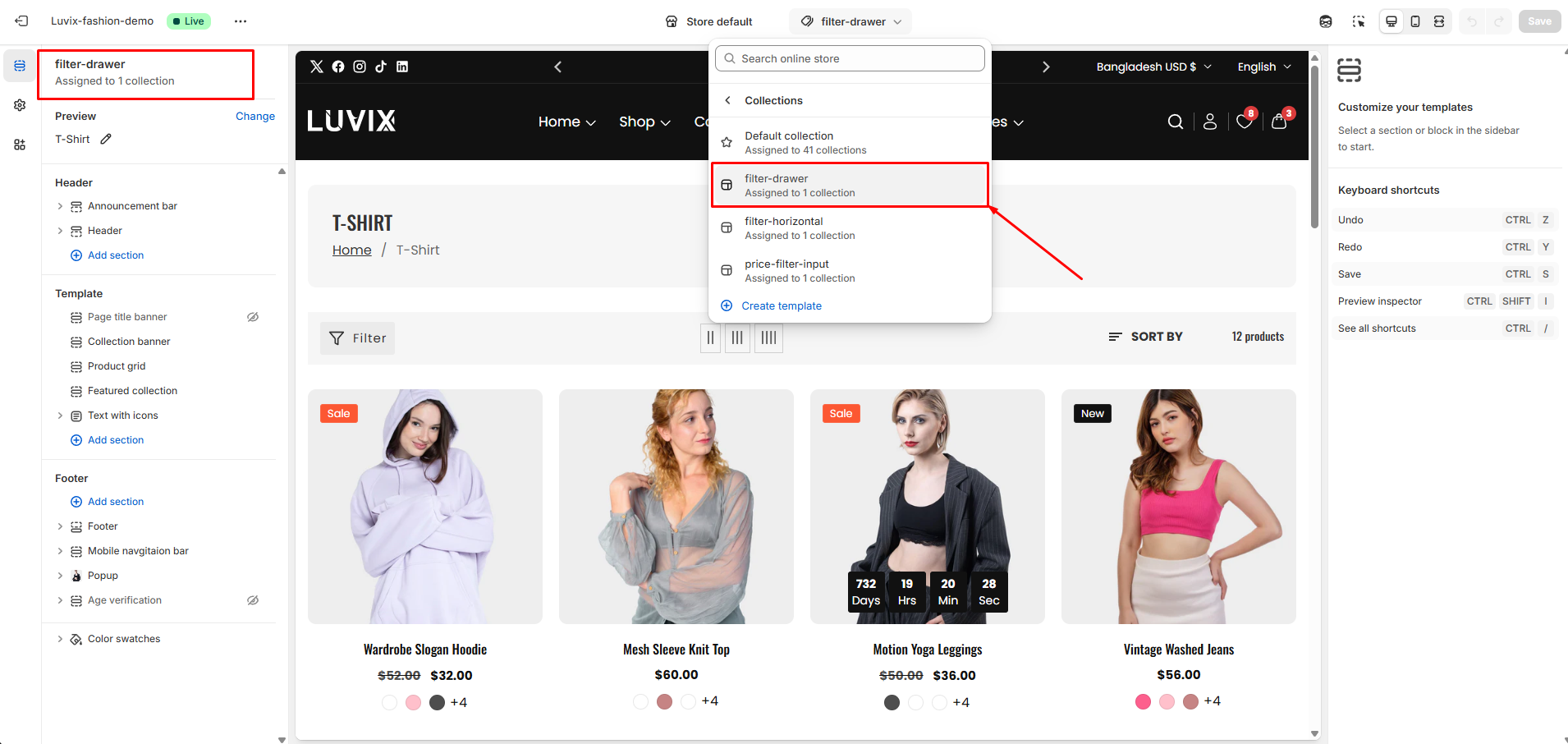
* Go to **Collections > Create template**
* Follow the given **screenshots -**

<div><figure><img src="https://2658914724-files.gitbook.io/~/files/v0/b/gitbook-x-prod.appspot.com/o/spaces%2FTsBtmFQxtPZrKf7veaAQ%2Fuploads%2FZkHgTsVfIbYndCwbdOX6%2FScreenshot_22.png?alt=media&#x26;token=a3cf65a2-ec24-4484-81e8-10a36f87a0c5" alt=""><figcaption></figcaption></figure> <figure><img src="https://2658914724-files.gitbook.io/~/files/v0/b/gitbook-x-prod.appspot.com/o/spaces%2FTsBtmFQxtPZrKf7veaAQ%2Fuploads%2F6X5IXULTBgxSjWm6sASV%2FScreenshot_23.png?alt=media&#x26;token=f9e81272-b66b-4f77-9b76-1dc2c80661f9" alt=""><figcaption></figcaption></figure></div>

### Add a name&#x20;

For the new template, enter the Name in the field provided. **For example, the product name is: xyz**

<figure><img src="https://2658914724-files.gitbook.io/~/files/v0/b/gitbook-x-prod.appspot.com/o/spaces%2FTsBtmFQxtPZrKf7veaAQ%2Fuploads%2FJ6GiNXNEulXgz82UbcWq%2FScreenshot_24.png?alt=media&#x26;token=e049c14d-ea14-4149-b340-219972a45836" alt=""><figcaption></figcaption></figure>

### Select a template for your collection

{% hint style="success" %}
You have the flexibility to choose a collection template that suits your specific collection, enabling you to design unique layouts for each **individual collection.**
{% endhint %}

<figure><img src="https://2658914724-files.gitbook.io/~/files/v0/b/gitbook-x-prod.appspot.com/o/spaces%2FTsBtmFQxtPZrKf7veaAQ%2Fuploads%2FITiMWrMAXvIqRGdGKEAk%2FScreenshot_25.png?alt=media&#x26;token=aa928a45-ca66-4076-9555-5d1b310cbe7d" alt=""><figcaption></figcaption></figure>

### Customize the new collection template

<figure><img src="https://2658914724-files.gitbook.io/~/files/v0/b/gitbook-x-prod.appspot.com/o/spaces%2FTsBtmFQxtPZrKf7veaAQ%2Fuploads%2FONSmGQNEnoz6YyRmxPnr%2FScreenshot_26.png?alt=media&#x26;token=84f6eb9d-4ec6-48b3-ba31-14e54ff36c68" alt=""><figcaption></figcaption></figure>