# Search page

## What is the search page?

Predictive search is a feature on Shopify that suggests products, pages, blog posts, collections, and query results as you type into the search bar. It uses the words and phrases from your product catalog, as well as from past customer searches, to generate suggestions that are relevant to what you're looking for.

Predictive search is a feature on Shopify that suggests products, pages, blog posts, collections, and query results as you type into the search bar. It uses the words and phrases from your product catalog, as well as from past customer searches, to generate suggestions that are relevant to what you're looking for.

{% hint style="success" %}
**Take the following steps:**

* In the theme editor (**Customize**), click on the **page selector**
* Go to the **Others > Search**
  {% endhint %}

<div><figure><img src="https://2658914724-files.gitbook.io/~/files/v0/b/gitbook-x-prod.appspot.com/o/spaces%2FTsBtmFQxtPZrKf7veaAQ%2Fuploads%2FtJVnfiICwSTCo6Z46kuu%2FScreenshot_73.png?alt=media&#x26;token=be4c5b91-a548-4407-8cbe-522933c52f64" alt=""><figcaption></figcaption></figure> <figure><img src="https://2658914724-files.gitbook.io/~/files/v0/b/gitbook-x-prod.appspot.com/o/spaces%2FTsBtmFQxtPZrKf7veaAQ%2Fuploads%2Fr2wkmuuogwveiJicfVS2%2FScreenshot_74.png?alt=media&#x26;token=a87201ab-1777-434c-a398-9f18909481eb" alt=""><figcaption></figcaption></figure></div>

## Section settings

| Settings                         | Description                                                                                                                                                                                                                                                                                                                                                                                                                        |
| -------------------------------- | ---------------------------------------------------------------------------------------------------------------------------------------------------------------------------------------------------------------------------------------------------------------------------------------------------------------------------------------------------------------------------------------------------------------------------------- |
| **Page width**                   | <ul><li><strong>Boxed</strong>: With boxed width, page content can be displayed within the maximum width. <strong>The page width can be changed in Theme Settings > Layout.</strong></li><li><strong>Full width:</strong> With the "Full width" option, page content can be displayed in its entirety full-width. <strong>When you show content at full width, you can add padding to the left and right sides.</strong></li></ul> |
| **Products per page**            | You can change the "**Products per page**" limit from 8 to 100 maximum on the collection page                                                                                                                                                                                                                                                                                                                                      |
| **Number of columns on desktop** | You can change the number of columns on desktop                                                                                                                                                                                                                                                                                                                                                                                    |
| **Display one column on mobile** | You can display one column on mobile. By default, 2 columns will be displayed                                                                                                                                                                                                                                                                                                                                                      |
| **Enable layout switcher**       | <p>You can enable/disable the product column switcher -</p><p><img src="https://2658914724-files.gitbook.io/~/files/v0/b/gitbook-x-prod.appspot.com/o/spaces%2FTsBtmFQxtPZrKf7veaAQ%2Fuploads%2FqgRQISp3k81s9viihYyk%2FScreenshot_75.png?alt=media&#x26;token=47a8ea9d-dc63-4e95-a535-050c99ee92ad" alt="" data-size="original"></p>                                                                                               |

## Filtering & sorting

* Enable filtering

<figure><img src="https://2658914724-files.gitbook.io/~/files/v0/b/gitbook-x-prod.appspot.com/o/spaces%2FTsBtmFQxtPZrKf7veaAQ%2Fuploads%2FPMBoIlpyzdvQbCz5RAP7%2FScreenshot_76.png?alt=media&#x26;token=c6f668b9-bfde-48fa-991f-cbfb0eea84fd" alt=""><figcaption></figcaption></figure>

### How to customize the filtering

* Go to this page and follow the instructions -

{% content-ref url="../general-topics-faq/add-shopify-2.0-storefront-product-filtering" %}
[add-shopify-2.0-storefront-product-filtering](https://themihub.gitbook.io/luvix-theme/general-topics-faq/add-shopify-2.0-storefront-product-filtering)
{% endcontent-ref %}

### Desktop filter layout

{% tabs %}
{% tab title="Vertical" %}

<figure><img src="https://2658914724-files.gitbook.io/~/files/v0/b/gitbook-x-prod.appspot.com/o/spaces%2FTsBtmFQxtPZrKf7veaAQ%2Fuploads%2FYMajQtw5zmHsjEAuImFH%2FScreenshot_77.png?alt=media&#x26;token=2ac461d0-0425-4a39-91f0-e39e0730076f" alt=""><figcaption></figcaption></figure>
{% endtab %}

{% tab title="Horizontal" %}

<figure><img src="https://2658914724-files.gitbook.io/~/files/v0/b/gitbook-x-prod.appspot.com/o/spaces%2FTsBtmFQxtPZrKf7veaAQ%2Fuploads%2FiB0VKonlrpZ9K7Kzse3X%2FScreenshot_78.png?alt=media&#x26;token=82fbbb1e-852d-4497-a1f7-6197b406b319" alt=""><figcaption></figcaption></figure>
{% endtab %}

{% tab title="Drawer" %}

<figure><img src="https://2658914724-files.gitbook.io/~/files/v0/b/gitbook-x-prod.appspot.com/o/spaces%2FTsBtmFQxtPZrKf7veaAQ%2Fuploads%2FSOSo6et7WUq6O8j8lGwY%2FScreenshot_79.png?alt=media&#x26;token=0e74100c-ad4d-4eca-9242-0ae9fea8a210" alt=""><figcaption></figcaption></figure>
{% endtab %}
{% endtabs %}

### Enable sorting

<figure><img src="https://2658914724-files.gitbook.io/~/files/v0/b/gitbook-x-prod.appspot.com/o/spaces%2FTsBtmFQxtPZrKf7veaAQ%2Fuploads%2Fy9FqzXF0quOZFABe2AbQ%2FScreenshot_80.png?alt=media&#x26;token=a38b97be-f521-4a3c-9be0-34220500e5b7" alt=""><figcaption></figcaption></figure>

### Price filter layout

{% tabs %}
{% tab title="Range slider" %}

<figure><img src="https://2658914724-files.gitbook.io/~/files/v0/b/gitbook-x-prod.appspot.com/o/spaces%2FTsBtmFQxtPZrKf7veaAQ%2Fuploads%2FzdtbHkRMx2O3U6xGqoIY%2FScreenshot_82.png?alt=media&#x26;token=eda22df0-0b94-4afa-8c6c-6ac6a8f54302" alt=""><figcaption></figcaption></figure>
{% endtab %}

{% tab title="Input field" %}

<figure><img src="https://2658914724-files.gitbook.io/~/files/v0/b/gitbook-x-prod.appspot.com/o/spaces%2FTsBtmFQxtPZrKf7veaAQ%2Fuploads%2FxQiDI8e5fFNQHnQS5QHu%2FScreenshot_81.png?alt=media&#x26;token=4968ccd2-8cf9-40a5-a87d-346231204c1f" alt=""><figcaption></figcaption></figure>
{% endtab %}
{% endtabs %}

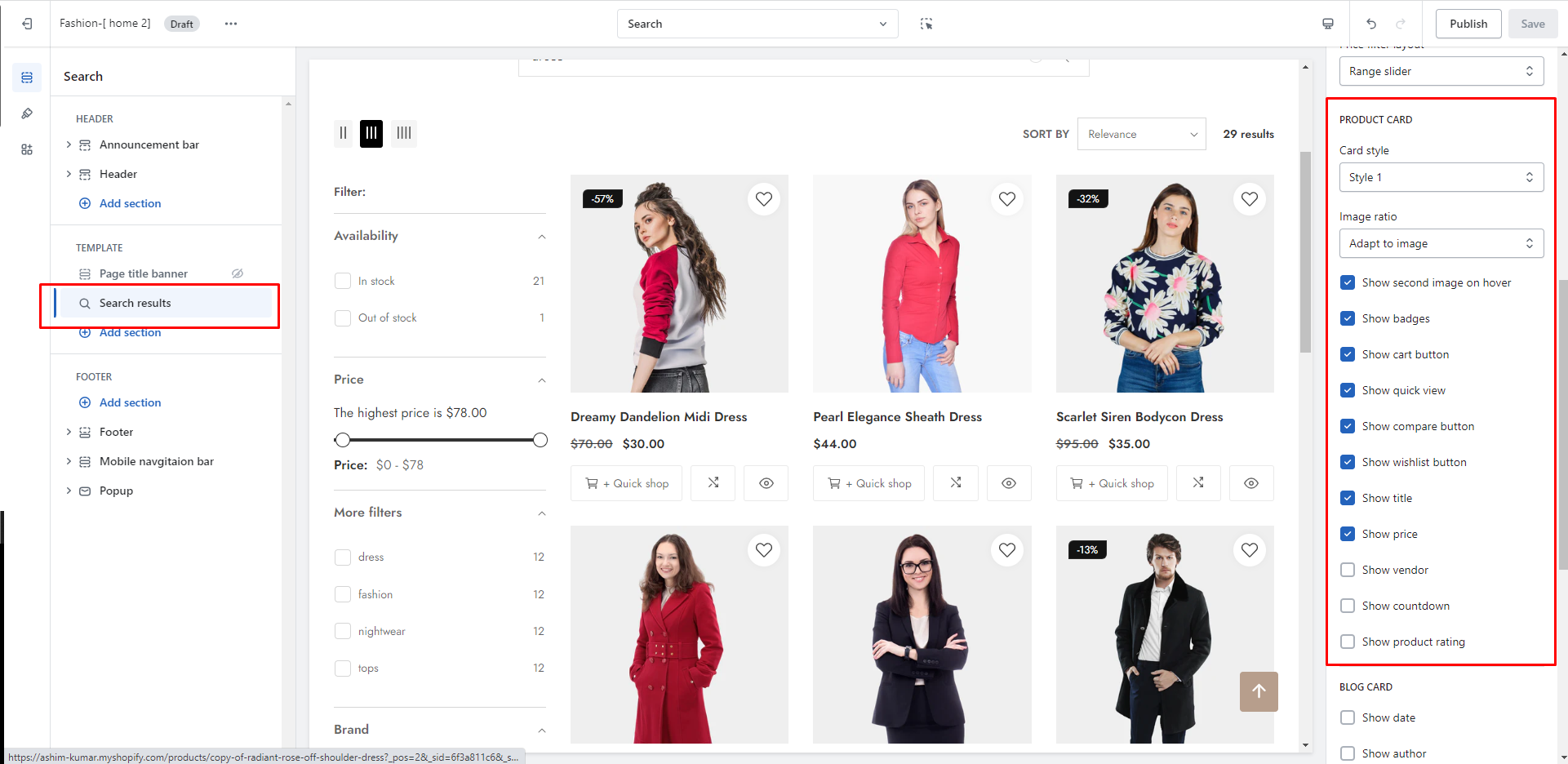
## Product card

<figure><img src="https://content.gitbook.com/content/TsBtmFQxtPZrKf7veaAQ/blobs/wnFYPf8pCcTQVUd7rCA1/search_product_card.png" alt=""><figcaption></figcaption></figure>

| Settings                       | Description                                                                                                                                                                                                                                                                                                                                       |
| ------------------------------ | ------------------------------------------------------------------------------------------------------------------------------------------------------------------------------------------------------------------------------------------------------------------------------------------------------------------------------------------------- |
| **Card style**                 | <ul><li><strong>Style 1:</strong> All action buttons will <strong>always be displayed</strong> if you select this</li><li><strong>Style 2:</strong> All action buttons will appear <strong>on hover</strong> when you select it</li></ul>                                                                                                         |
| **Image ratio**                | <ul><li><strong>Adapt to image:</strong> Uses the aspect ratio of the collection images is cropped.</li><li><strong>Portrait</strong>: uses a 2:3 cropping ratio to the images.</li><li><strong>Square:</strong> uses a 1:1 cropping ratio to the images.</li><li><strong>Landscape:</strong>  uses a 3:2 cropping ratio to the images.</li></ul> |
| **Enable color swatches**      | To display color swatches, you need to enable it. **\[**[**Learn more**](https://themihub.gitbook.io/luvix-theme/theme-settings/color-swatches)**]**                                                                                                                                                                                              |
| **Show second image on hover** | Shows the second product image when a customer moves their mouse over the first image.                                                                                                                                                                                                                                                            |
| **Show badges**                | For particular sections, you can show or hide product badges.                                                                                                                                                                                                                                                                                     |
| **Show cart button**           | For particular sections, you can show or hide the **cart button**.                                                                                                                                                                                                                                                                                |
| **Show pre-order button**      | You may want to allow customers to purchase out-of-stock items. **\[**[**Learn more\]**](https://themihub.gitbook.io/luvix-theme/general-topics-faq/how-to-enable-the-pre-order-product-to-your-store)                                                                                                                                            |
| **Show quick view**            | For particular sections, you can show or hide the **quick view.**                                                                                                                                                                                                                                                                                 |
| **Show compare button**        | For particular sections, you can show or hide the **compare button.**                                                                                                                                                                                                                                                                             |
| **Show wishlist button**       | For particular sections, you can show or hide the **wishlist button.**                                                                                                                                                                                                                                                                            |
| **Show title**                 | For particular sections, you can show or hide the **title.**                                                                                                                                                                                                                                                                                      |
| **Show price**                 | For particular sections, you can show or hide the **wishlist price.**                                                                                                                                                                                                                                                                             |
| **Show vendor**                | For particular sections, you can show or hide the **wishlist vendor.**                                                                                                                                                                                                                                                                            |
| **Show countdown**             | To display the countdown timer, you need to enable it. \[[**Learn more**](https://themihub.gitbook.io/luvix-theme/collections-and-products/products/add-a-countdown-timer-to-the-product)]                                                                                                                                                        |
| **Show product rating**        | To display the product rating, you need to enable it. \[[**Learn more**](https://themihub.gitbook.io/luvix-theme/general-topics-faq/how-to-add-product-reviews-to-your-store)]                                                                                                                                                                    |

## Blog card

<figure><img src="https://2658914724-files.gitbook.io/~/files/v0/b/gitbook-x-prod.appspot.com/o/spaces%2FTsBtmFQxtPZrKf7veaAQ%2Fuploads%2Fdur4rI4PhuEdP9oFrAsn%2FScreenshot_83.png?alt=media&#x26;token=b26462ae-7265-4447-b214-d75a492a72c7" alt=""><figcaption></figcaption></figure>

## Section padding

| Settings                    | Description                                                                                                                          |
| --------------------------- | ------------------------------------------------------------------------------------------------------------------------------------ |
| **Desktop**: Padding top    | The section’s top inner space height is determined. From 0 to 150 px, will be incremented by 5px. **It will affect the desktop.**    |
| **Desktop**: Padding bottom | The section’s bottom inner space height is determined. From 0 to 150 px, will be incremented by 5px. **It will affect the desktop.** |
| **Mobile**: Padding top     | The section’s top inner space height is determined. From 0 to 150 px, will be incremented by 5px. **It will affect the mobile.**     |
| **Mobile**: Padding bottom  | The section’s top inner space height is determined. From 0 to 150 px, will be incremented by 5px. **It will affect the mobile.**     |