# Wishlist page

## What is a wishlist page?

The wishlist page of a Shopify theme is a page that allows customers to save products that they are interested in for later. The page typically includes a list of all the products that the customer has added to their wishlist, as well as information about each product, such as the product name, price, and image. Customers can also add and remove products from their wishlist, and share their wishlist with others.

<figure><img src="https://2658914724-files.gitbook.io/~/files/v0/b/gitbook-x-prod.appspot.com/o/spaces%2FTsBtmFQxtPZrKf7veaAQ%2Fuploads%2FndqaaQdryrO0GCyHUaiA%2FScreenshot_86.png?alt=media&#x26;token=e4907316-d320-4e0e-af24-1907bd0d9919" alt=""><figcaption></figcaption></figure>

## Create wishlist page

{% hint style="success" %}

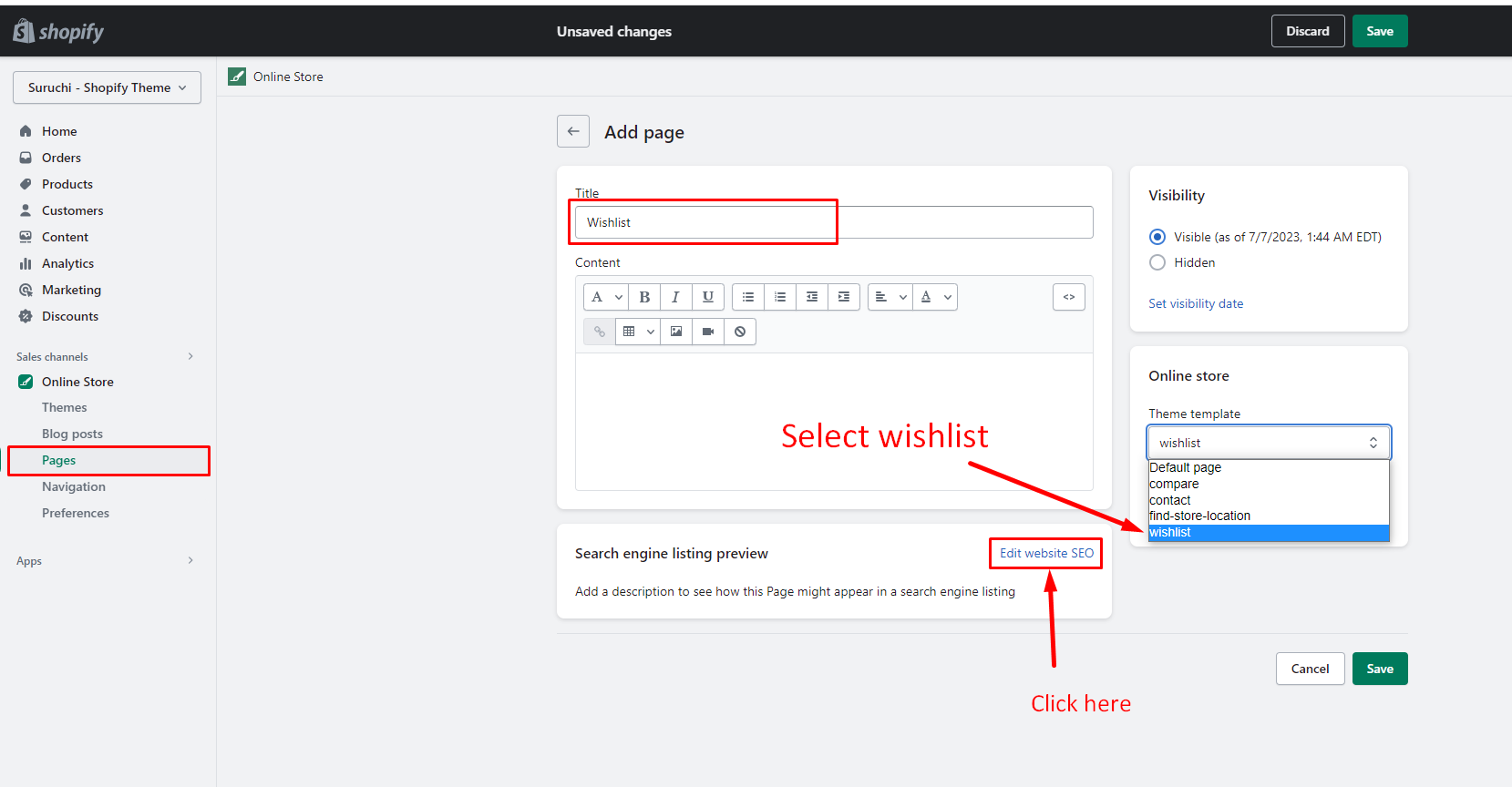
* From your Shopify admin, go to **Online Store** > [**Pages**](https://www.shopify.com/admin/pages).
* Click **Add page**.
* Enter a title: Wishlist
* Set **Visibility**
* Select **Theme template: wishlist**
* URL and handle: **/pages/wishlist** (<mark style="color:red;">**Mandatory**</mark>)
* Click **Save**.
  {% endhint %}

## Step 1

<figure><img src="https://2658914724-files.gitbook.io/~/files/v0/b/gitbook-x-prod.appspot.com/o/spaces%2FTsBtmFQxtPZrKf7veaAQ%2Fuploads%2FR2LOzwJXetV5PNrvsF9u%2FScreenshot_87.png?alt=media&#x26;token=260d71d4-6e8e-4275-9a71-924e6da2aa61" alt=""><figcaption></figcaption></figure>

## Step 2

<figure><img src="https://content.gitbook.com/content/TsBtmFQxtPZrKf7veaAQ/blobs/LXbO8T6W2nrRn56sJoB7/wishlist-1.png" alt=""><figcaption></figcaption></figure>

## Step 3

<figure><img src="https://2658914724-files.gitbook.io/~/files/v0/b/gitbook-x-prod.appspot.com/o/spaces%2FTsBtmFQxtPZrKf7veaAQ%2Fuploads%2FtXgcIDYpMk6fsoSSABZM%2FScreenshot_89.png?alt=media&#x26;token=15333de9-f07c-485f-aa1e-cb69db10c5db" alt=""><figcaption></figcaption></figure>