# Cart

{% hint style="success" %}
**Take the following steps:**

1. In the theme editor (**Customize**), click **Theme settings**
2. Locate **Cart**
3. Make the necessary adjustments.
4. **Save**
   {% endhint %}

<figure><img src="https://2658914724-files.gitbook.io/~/files/v0/b/gitbook-x-prod.appspot.com/o/spaces%2FTsBtmFQxtPZrKf7veaAQ%2Fuploads%2FH0dwwPPKb53prPMNpztH%2FScreenshot_166.png?alt=media&#x26;token=176d738c-ae1f-433a-bed4-ec7dd09e1d80" alt=""><figcaption></figcaption></figure>

## Cart type

1. **Drawer**
2. **Page**&#x20;

| Settings   | Description                                                                                                                                                                  |
| ---------- | ---------------------------------------------------------------------------------------------------------------------------------------------------------------------------- |
| **Drawer** | By selecting this option, the cart will utilize **Ajax** technology (**Without page reloading**), and the cart drawer will smoothly appear on the right side of the website. |
| **Page**   | By selecting this option, the cart will **redirect to the cart page**. There is **no Ajax**, **Shopping will directly go to the cart page.**                                 |

### Cart Drawer settings

| Settings                                                                            | Description                                                                                                                                                                                                                                                                                                                                                                                                                                                                                                                                                                                                                                                                                                                                        |
| ----------------------------------------------------------------------------------- | -------------------------------------------------------------------------------------------------------------------------------------------------------------------------------------------------------------------------------------------------------------------------------------------------------------------------------------------------------------------------------------------------------------------------------------------------------------------------------------------------------------------------------------------------------------------------------------------------------------------------------------------------------------------------------------------------------------------------------------------------- |
| **Show vendor**                                                                     | You can show the vendor name on the Shopping cart product.                                                                                                                                                                                                                                                                                                                                                                                                                                                                                                                                                                                                                                                                                         |
| **Show cart note**                                                                  | <p>You can show/hide the cart in the cart drawer.   Customers can add a note during the shopping cart. The seller will get the note on the order page.<br><br></p><p><img src="https://2658914724-files.gitbook.io/~/files/v0/b/gitbook-x-prod.appspot.com/o/spaces%2FTsBtmFQxtPZrKf7veaAQ%2Fuploads%2FfompHolRpGZWrSRcJKZk%2FScreenshot_167.png?alt=media&#x26;token=f87b85a3-dd7b-4d2d-8284-5e156b7adec8" alt="" data-size="original"><br><br><img src="https://2658914724-files.gitbook.io/~/files/v0/b/gitbook-x-prod.appspot.com/o/spaces%2FTsBtmFQxtPZrKf7veaAQ%2Fuploads%2FOTJTfhB3IWy7pBFV3jpK%2FScreenshot_167---.png?alt=media&#x26;token=dba137c3-a0ee-4be0-b4b6-5aa1f1adcfd6" alt="" data-size="original"></p>                         |
| **Show shipping calculator**                                                        | <p>A "shipping calculator" for an e-commerce website is a tool or feature that allows customers to estimate the cost of shipping their purchases before finalizing their orders.<br><br><img src="https://2658914724-files.gitbook.io/~/files/v0/b/gitbook-x-prod.appspot.com/o/spaces%2FTsBtmFQxtPZrKf7veaAQ%2Fuploads%2FGqv2BxpKnwqMje8d5U8t%2FScreenshot_168.png?alt=media&#x26;token=26ba5d4e-b0a8-4c01-92cb-45ecfe118573" alt="" data-size="original"><br><br><img src="https://2658914724-files.gitbook.io/~/files/v0/b/gitbook-x-prod.appspot.com/o/spaces%2FTsBtmFQxtPZrKf7veaAQ%2Fuploads%2FUtcWtYJ4MALWQRZ1Ehxv%2FScreenshot_168----.png?alt=media&#x26;token=6123fc88-cb09-4331-9782-b8a86e8748e9" alt="" data-size="original"></p>     |
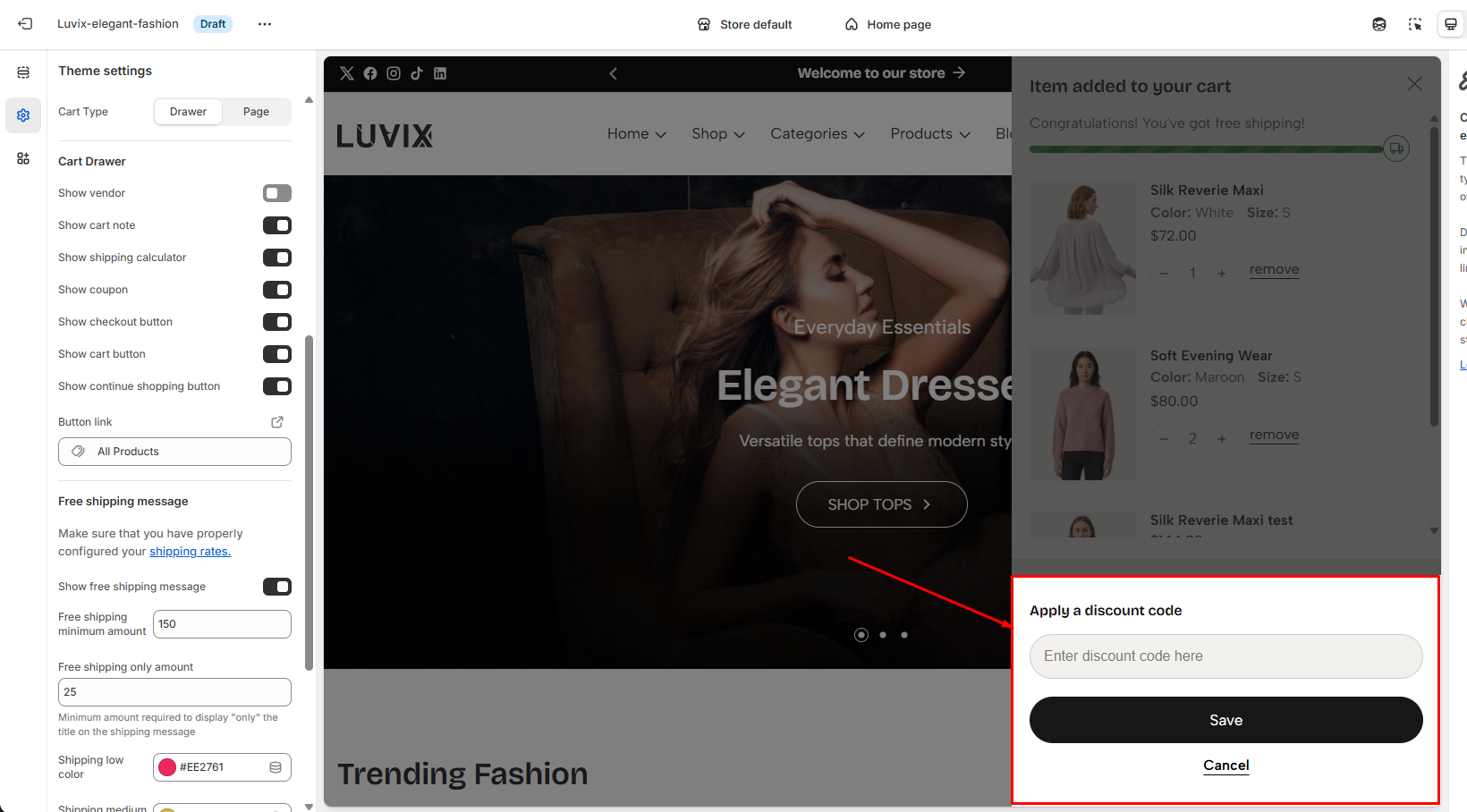
| **Show coupon**                                                                     | <p>A "coupon code" for an ecommerce website is a unique alphanumeric code that customers can apply during the checkout process to receive a discount or special offer on their purchase.<br><img src="https://2658914724-files.gitbook.io/~/files/v0/b/gitbook-x-prod.appspot.com/o/spaces%2FTsBtmFQxtPZrKf7veaAQ%2Fuploads%2FzmzNeDeXnuSJEKM3W0HR%2FScreenshot_169.png?alt=media&#x26;token=fe08dded-bd5b-4ece-9b0d-884815db6f89" alt="" data-size="original"><br><br><img src="https://2658914724-files.gitbook.io/~/files/v0/b/gitbook-x-prod.appspot.com/o/spaces%2FTsBtmFQxtPZrKf7veaAQ%2Fuploads%2FcxU9LtAKbRwXHaHXlXSi%2FScreenshot_171.png?alt=media&#x26;token=b13f97c8-077d-49bb-aab6-54b29f18851a" alt="" data-size="original"><br></p> |
| <p><strong>Show checkout button</strong> <br><strong>Show cart button</strong> </p> | <img src="https://2658914724-files.gitbook.io/~/files/v0/b/gitbook-x-prod.appspot.com/o/spaces%2FTsBtmFQxtPZrKf7veaAQ%2Fuploads%2F4xazGEibNTkBnNJ59Im4%2FScreenshot_170.png?alt=media&#x26;token=7361ab1d-8ceb-4797-9516-1e719c11460d" alt="" data-size="original">                                                                                                                                                                                                                                                                                                                                                                                                                                                                                |
| **Show continue shopping button**                                                   | <img src="https://2658914724-files.gitbook.io/~/files/v0/b/gitbook-x-prod.appspot.com/o/spaces%2FTsBtmFQxtPZrKf7veaAQ%2Fuploads%2FwYEDmMbLxP6HoDyiyHF5%2FScreenshot_172.png?alt=media&#x26;token=e77648e7-7032-43f1-aeb8-1bec60bdc185" alt="" data-size="original">                                                                                                                                                                                                                                                                                                                                                                                                                                                                                |
| **Button link**                                                                     | You can add a link to the "**Continue shopping**" button                                                                                                                                                                                                                                                                                                                                                                                                                                                                                                                                                                                                                                                                                           |

## Free shipping bar

<figure><img src="https://2658914724-files.gitbook.io/~/files/v0/b/gitbook-x-prod.appspot.com/o/spaces%2FTsBtmFQxtPZrKf7veaAQ%2Fuploads%2F4t2QlZvBnhUt7k2Kk4ii%2FScreenshot_173.png?alt=media&#x26;token=65962a6a-e097-4489-975e-333d146fb039" alt=""><figcaption></figcaption></figure>

> Make sure that you have properly configured your [shipping rates.](https://patu-theme.myshopify.com/admin/settings/shipping)

| Settings                         | Description                                                                                                                                                          |
| -------------------------------- | -------------------------------------------------------------------------------------------------------------------------------------------------------------------- |
| **Show free shipping message**   | You can enable/disable it.                                                                                                                                           |
| **Free shipping minimum amount** | What is the minimum purchase amount for customers to get for free shipping? You need to set the amount                                                               |
| **Free shipping only amount**    | The minimum amount required to display "only" the title on the shipping message. **This will help the customer understand and get free shipping on small purchases** |
| **Shipping low color**           | For various conditions, you can change the color of the shipping bar.                                                                                                |
| **Shipping medium color**        | For various conditions, you can change the color of the shipping bar.                                                                                                |
| **Shipping high color**          | For various conditions, you can change the color of the shipping bar.                                                                                                |
| **Shipping success color**       | For various conditions, you can change the color of the shipping bar.                                                                                                |

## Gift Wrapping

<figure><img src="https://2658914724-files.gitbook.io/~/files/v0/b/gitbook-x-prod.appspot.com/o/spaces%2FTsBtmFQxtPZrKf7veaAQ%2Fuploads%2FnTfmwt7zh5GLFSVLBsoW%2FScreenshot_174.png?alt=media&#x26;token=8ddee6d3-866d-4e97-86a7-120191ce8783" alt=""><figcaption></figcaption></figure>

### How to add a gift wrap option to your cart

{% hint style="success" %}
Go to this page for more information, [**click here**](https://themihub.gitbook.io/luvix-theme/general-topics-faq/add-a-gift-wrap-option-to-your-cart)
{% endhint %}