# Colors

{% hint style="success" %}
**Take the following steps:**

1. In the theme editor (**Customize**), click **Theme settings**
2. Locate **Color settings**
3. Make the necessary adjustments.
4. **Save**
   {% endhint %}

<figure><img src="https://2658914724-files.gitbook.io/~/files/v0/b/gitbook-x-prod.appspot.com/o/spaces%2FTsBtmFQxtPZrKf7veaAQ%2Fuploads%2FWPI1bNCGgd69YcCMiqnL%2FScreenshot_129.png?alt=media&#x26;token=89eb89c1-19d3-4e06-b4e5-218897f66ab5" alt=""><figcaption></figcaption></figure>

## Add a color scheme group

<figure><img src="https://2658914724-files.gitbook.io/~/files/v0/b/gitbook-x-prod.appspot.com/o/spaces%2FTsBtmFQxtPZrKf7veaAQ%2Fuploads%2FQelPCbRsDZHiZK0JGeEW%2FScreenshot_130.png?alt=media&#x26;token=655cd42b-b366-4c7e-8488-6c97dab6b93f" alt=""><figcaption></figcaption></figure>

| Settings                     | Description                                                              |
| ---------------------------- | ------------------------------------------------------------------------ |
| Background                   | This is a field to add background color                                  |
| Background gradient          | Background gradient replaces background where possible.                  |
| Text                         | This is a field to add text color                                        |
| **Primary/Solid button**     | **Solid background button**                                              |
| Button background            | This is a field to change the **solid button** background color          |
| Button text                  | This is a field to change the **solid button** text color                |
| Button background hover      | This is a field to change the **solid button** hover background color    |
| Button text hover            | This is a field to change the **solid button** hover text color          |
| **Secondary/Outline Button** | **Outline button**                                                       |
| Outline button               | This is the field to change the **outline button** text and border-color |
| Button background hover      | This is a field to change the **outline button** hover background color  |
| Button text hover            | This is a field to change the **outline button** hover text color        |
| **Text link**                |                                                                          |
| Text link hover              | You can add a hover color to the link                                    |

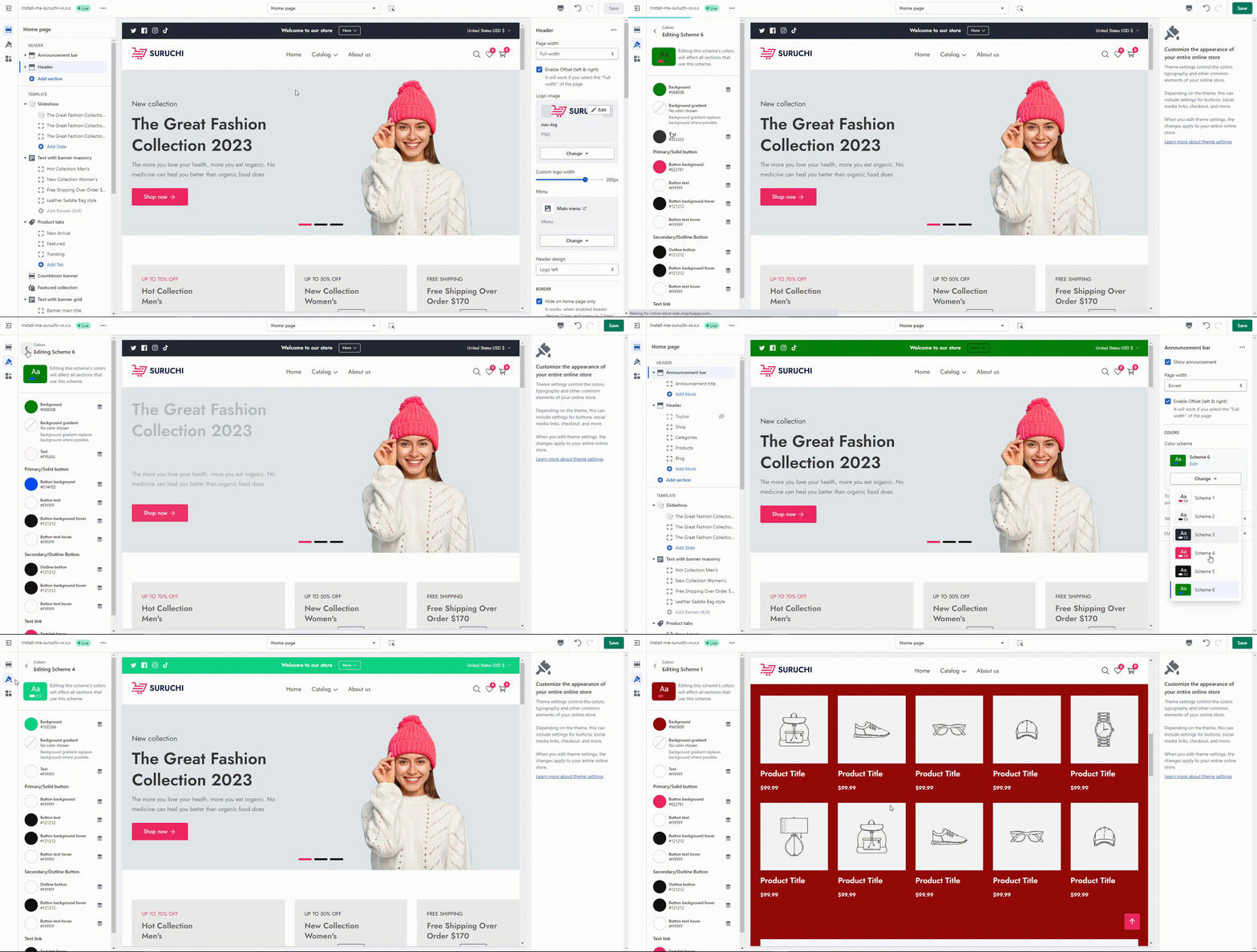
## Edit the existing color scheme group

<div><figure><img src="https://2658914724-files.gitbook.io/~/files/v0/b/gitbook-x-prod.appspot.com/o/spaces%2FTsBtmFQxtPZrKf7veaAQ%2Fuploads%2FUDPlAguFvuzixt8Lx54u%2FScreenshot_131.png?alt=media&#x26;token=fd015028-ca7d-40ef-b9da-88f98735396c" alt=""><figcaption></figcaption></figure> <figure><img src="https://2658914724-files.gitbook.io/~/files/v0/b/gitbook-x-prod.appspot.com/o/spaces%2FTsBtmFQxtPZrKf7veaAQ%2Fuploads%2FxGKX0gORb34iLANTh1nY%2FScreenshot_132.png?alt=media&#x26;token=c1562a4b-a1b0-4046-b403-4b3f059ee174" alt=""><figcaption></figcaption></figure></div>

## Change color to section

After adding the color scheme group, you can add/change the color scheme for the specific section

<figure><img src="https://2658914724-files.gitbook.io/~/files/v0/b/gitbook-x-prod.appspot.com/o/spaces%2FTsBtmFQxtPZrKf7veaAQ%2Fuploads%2FeNL6R7adpO7UYHgtJ2Qx%2FScreenshot_133.png?alt=media&#x26;token=9e6efd75-1742-41d5-8968-88a7f827e9fb" alt=""><figcaption></figcaption></figure>

## Summary

<figure><img src="https://content.gitbook.com/content/TsBtmFQxtPZrKf7veaAQ/blobs/yJ4LKqyUGeeZCLUdNRyT/Untitled%20Project.gif" alt=""><figcaption></figcaption></figure>

## Video Tutorials

{% embed url="<https://www.youtube.com/watch?list=&v=VV_ogrnLGOM>" %}