> For the complete documentation index, see [llms.txt](https://themihub.gitbook.io/ambaz-shopify-theme/llms.txt). Markdown versions of documentation pages are available by appending `.md` to page URLs; this page is available as [Markdown](https://themihub.gitbook.io/ambaz-shopify-theme/collections-and-products/products/add-a-product-short-description-using-a-metafield.md).

# Add a product short description using a metafield

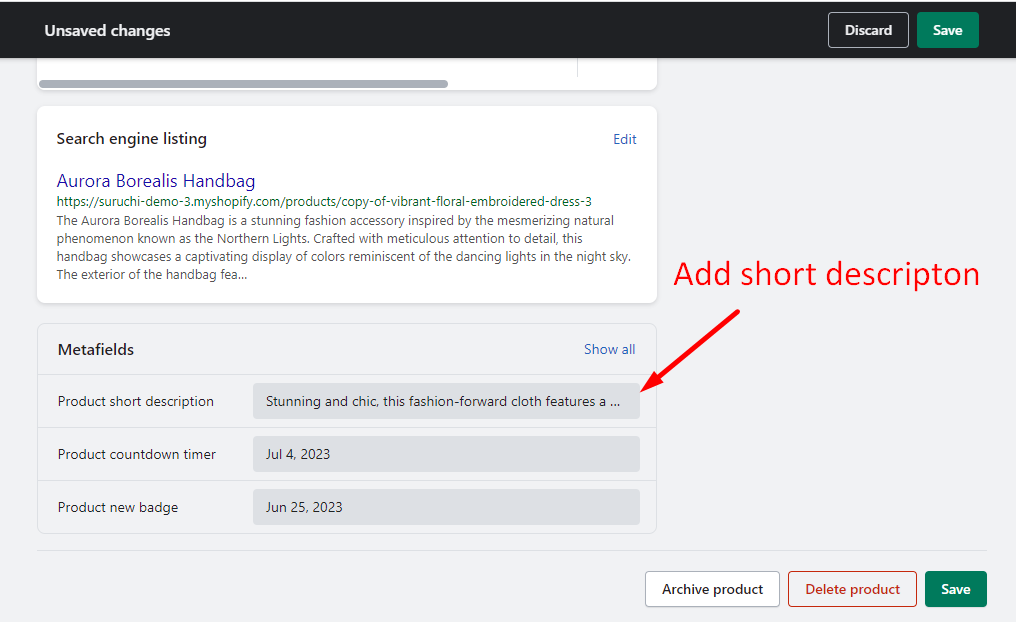
Add a product short description using a metafield on the product page

{% hint style="success" %}
**Take the following steps:**

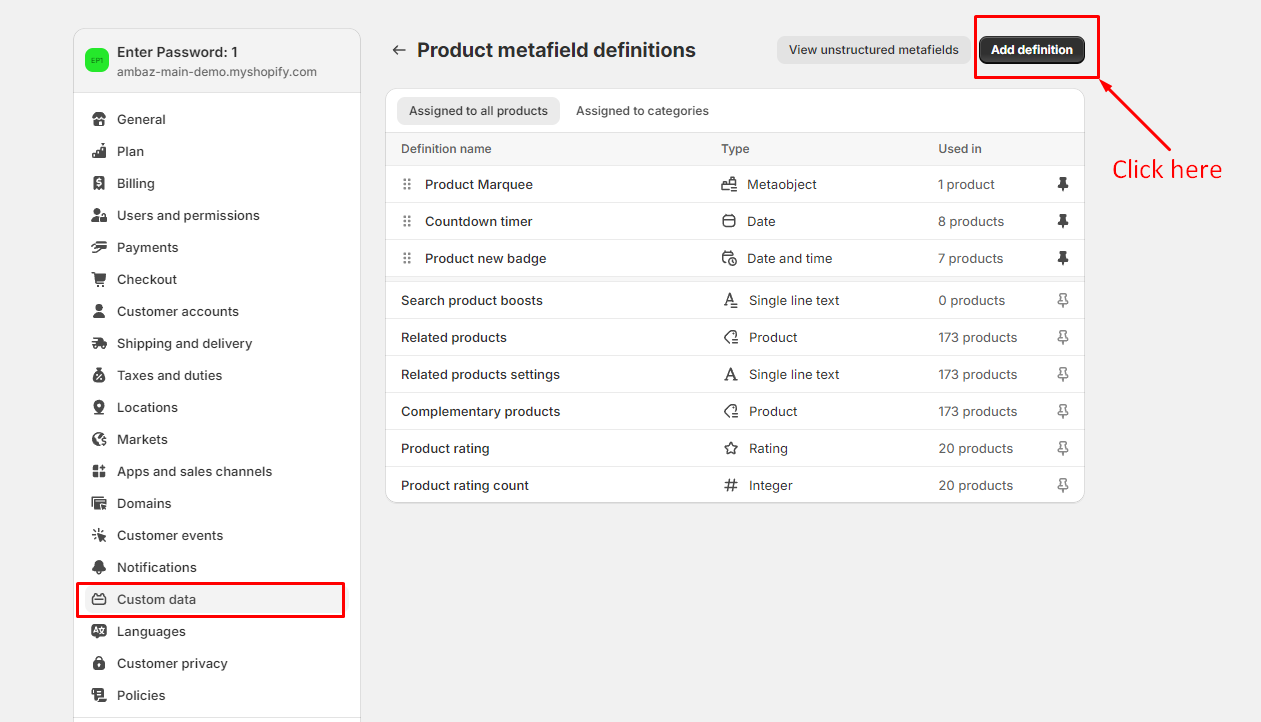
1. Go to the **admin > settings**
2. Then click on the **Custom data**
3. Then you will get the option to add a **Metafield**
4. After adding a metafield, you will be able to add a timer to the product
   {% endhint %}

## Step 1

<figure><img src="https://3841253931-files.gitbook.io/~/files/v0/b/gitbook-x-prod.appspot.com/o/spaces%2F8lSFkEqW0et1Ug9g55Xj%2Fuploads%2FjEocmSEU6EcjqJObq1XI%2Funiue2.png?alt=media&amp;token=641ebe41-81d9-487f-9644-820cc4bfb6e8" alt=""><figcaption></figcaption></figure>

## Step 2

<figure><img src="https://3841253931-files.gitbook.io/~/files/v0/b/gitbook-x-prod.appspot.com/o/spaces%2F8lSFkEqW0et1Ug9g55Xj%2Fuploads%2FZP0GHjREf45amlHcd81y%2Fnew-custom-data.png?alt=media&amp;token=f4968212-a593-43a1-ba04-22679f4f3d72" alt=""><figcaption></figcaption></figure>

## Step 3

{% hint style="success" %}
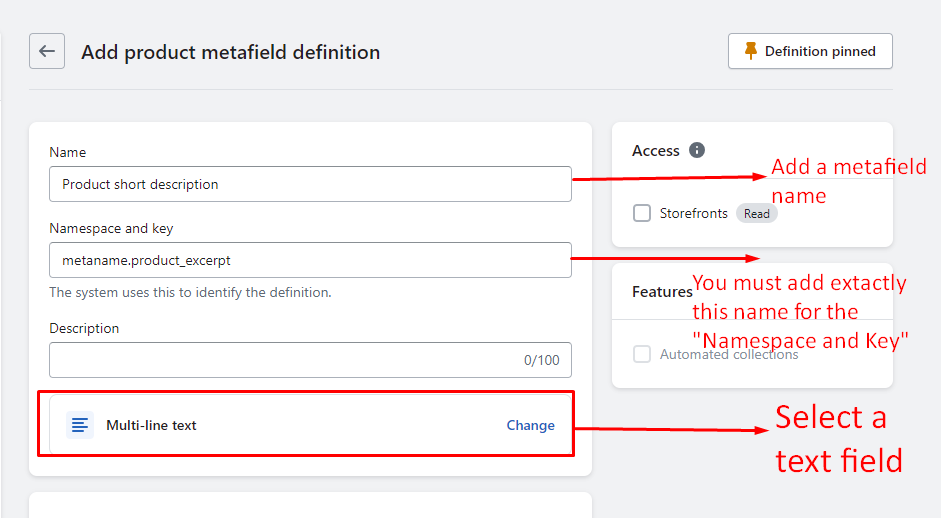
**Metafiled details**

1. **Name:**  Product Countdown Timer (**You can add any name**)
2. **Namespace and key:**  `metaname.product_excerpt` (It's a **mandatory name**, you must add exactly this name)
3. Select-type: **Date**
   {% endhint %}

<figure><img src="https://content.gitbook.com/content/8lSFkEqW0et1Ug9g55Xj/blobs/Aawf2W7z0k38i9EcMxha/short_description_metafield.png" alt=""><figcaption></figcaption></figure>

## Step 4

<figure><img src="https://3841253931-files.gitbook.io/~/files/v0/b/gitbook-x-prod.appspot.com/o/spaces%2F8lSFkEqW0et1Ug9g55Xj%2Fuploads%2Fv7LGlMnpZPt7v2QNiimv%2Funiue5.png?alt=media&amp;token=9d4deb63-5f88-4ca7-904f-709395ba71b4" alt=""><figcaption></figcaption></figure>

## Step 5

<figure><img src="https://content.gitbook.com/content/8lSFkEqW0et1Ug9g55Xj/blobs/VlDOW29bWcbmgbKu0iTy/short_description.png" alt=""><figcaption></figcaption></figure>

## Demo

<figure><img src="https://3841253931-files.gitbook.io/~/files/v0/b/gitbook-x-prod.appspot.com/o/spaces%2F8lSFkEqW0et1Ug9g55Xj%2Fuploads%2FJw2GzkCyAp9cJvVk58CW%2Fdescription.png?alt=media&amp;token=a5dac7f6-37aa-4602-be45-06d9128ab87c" alt=""><figcaption></figcaption></figure>